Guide to Using the TMAD APP
Link to the video: https://loom.com/share/144b7941f676404d88c46f461bdb0886
1. Logging into the TMAD App 0:15
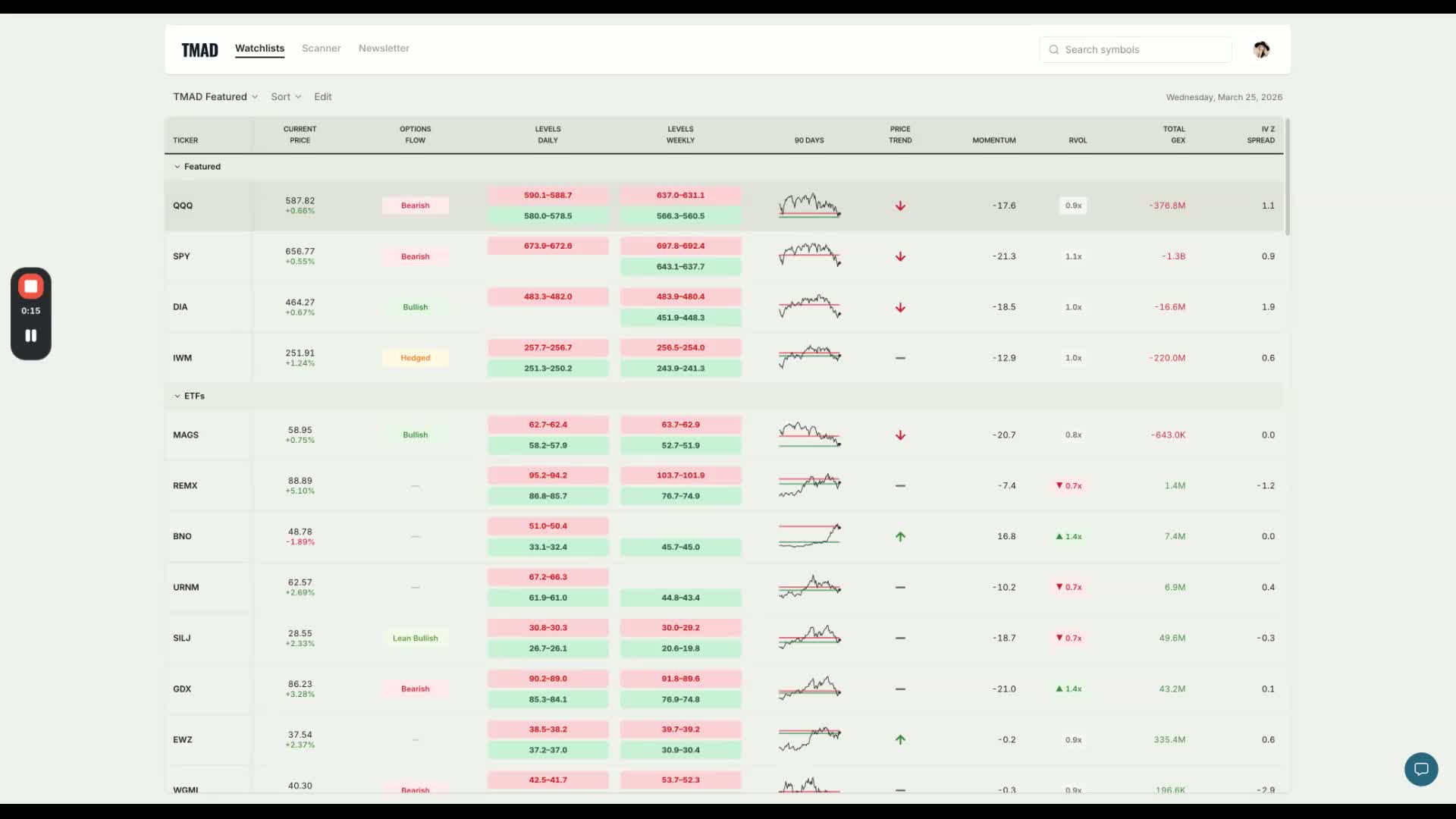
Go to tmad.app/signup
Sign up and create a profile using the same email for Substack or Discord.
Ensure you are using the email linked to your Stripe payment for membership access, verify your email before reaching out for support.
2. Overview of the Main Page 1:03
The main page includes:
Watchlist
Scanner
Newsletter
Focus on U.S. stocks and ETFs, as international stocks may have limited option flow.
3. Understanding Option Flow 2:06
Option flow indicators include:
Strong Bullish (green)
Bullish
Lean Bullish
Volatility Event
Hedging
Use the chat button for questions and support.
4. Accessing Help and Resources 2:51
Click on the Help section for:
Getting started guides
Updates on data throughout the trading day
Information on live prices and updates after hours.
5. Understanding Data Updates 3:25
Live prices update every 30 seconds during market hours.
Other data (e.g., options flow, momentum) updates after hours (4 PM - 6 PM ET).
No updates during weekends and holidays.
6. Learning the Dashboard 4:41
Familiarize yourself with the dashboard layout and features.
Contact support for technical issues:
Alessio for technical questions: alessio@tmad.app
Lia for membership issues: lia@tmad.app.
7. Analyzing Supply and Demand Levels 5:50
Supply-demand levels are shown on daily and weekly charts.
Use ranges instead of single numbers for trading decisions.
8. Using the Sparkline and Price Trend 7:40
The sparkline shows daily price trends.
Analyze indices relative to the 200-day moving average for trend direction.
9. Evaluating Momentum and Volume 8:04
Positive momentum indicates bullish trends; negative momentum indicates bearish trends.
Relative volume should be at least 1.5 for breakouts.
10. Scanning for Stocks 12:50
Use the scanner to filter stocks based on trends and option flow.
Analyze charts and option flow signals for potential trades.
11. Accessing the Newsletter 15:58
The newsletter section connects to discussions about specific stocks.
Review past newsletters for insights on stocks of interest.
12. Continuous Learning and Support 17:20
Read guides and ask questions to enhance your understanding of the app.
If you’d like to get an access to the app, simply upgrade this membership to paid.
Video LINK: https://loom.com/share/144b7941f676404d88c46f461bdb0886
Cheers,
Lia


